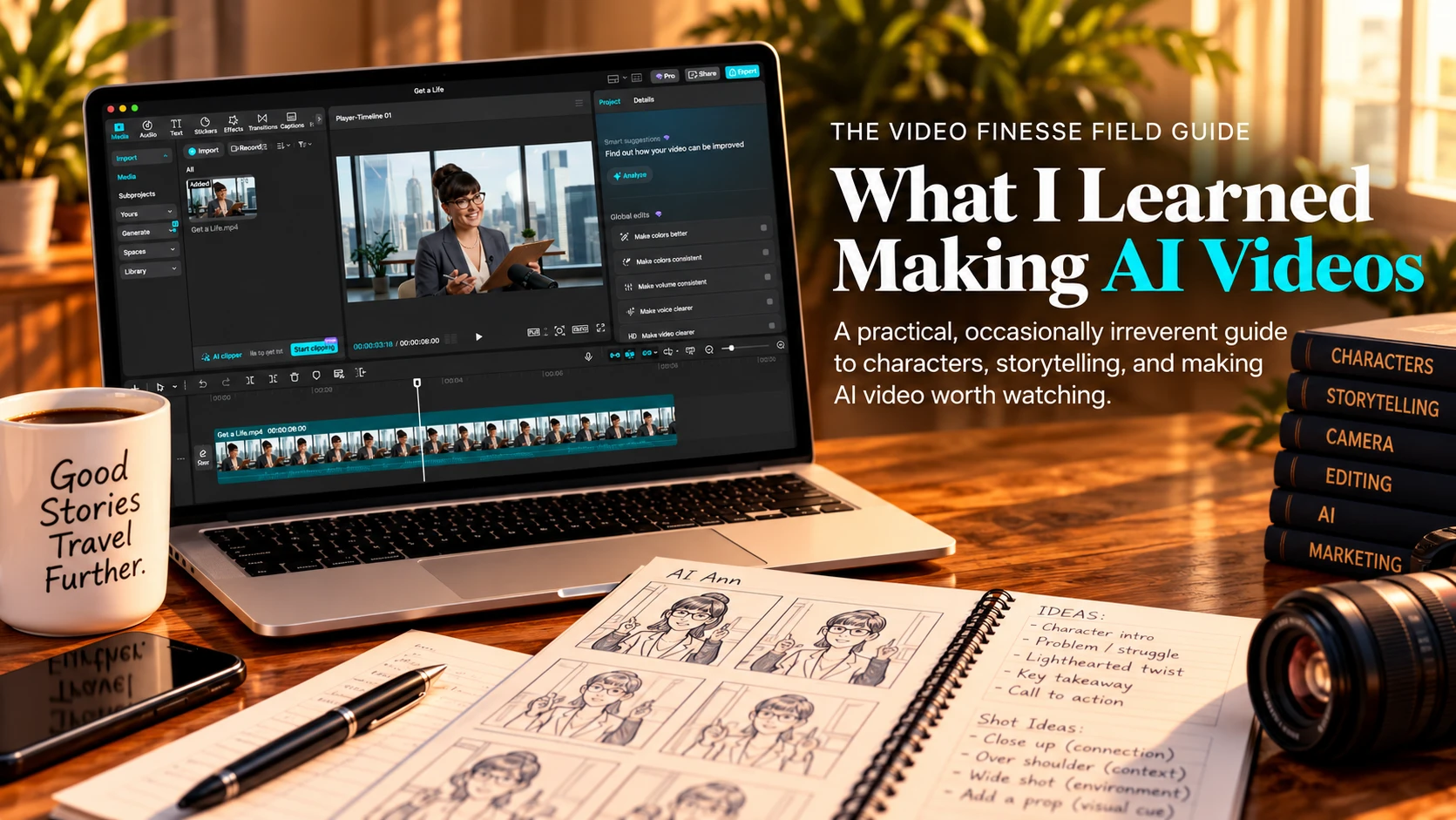
The Video Finesse Field Guide: What I Learned Making AI Videos

Read the Guide Online

THE AI VIDEO FIELD GUIDE

A Case for Character Development

If you’re an entrepreneur, there’s a good chance you realize that making videos to promote your business is not an option. It’s a requirement.

The marketing beast wants videos.

Ideally you have already started making your own videos so you can appreciate the amount of effort involved in getting made up, set up, and pepped up, just so you can hit the record button… which is something you probably do not enjoy or find particularly fulfilling.

Or perhaps you would like to get your nights and weekends back instead of pretending to enjoy video editing while everyone else is eating dinner.

On the other hand, some entrepreneurs have already started creating amazing generated content for their businesses. They have discovered that making videos with AI can dramatically reduce the time, cost, and complexity of traditional video production.

So whether you are planning to produce AI videos for yourself, or prefer to hire a professional to do it for you… the principles in this guide should give you a head start. These are not prompt hacks.

This is a Production Philosophy derived from my own AI video experience. It’s about the mindset and key principles involved with creating AI character models, story sets, and finished videos.

Also included: a Camera Language Primer to help direct your AI camera perspective with greater emotional intention.

So just exactly what is a character?

The Character is a curated set of unique and memorable looks, expressions, and traits designed to trigger instant recognition. It includes mannerisms, attitude, style, quirks, even the way someone carries themselves.

Principle #1

CHARACTER over CLONE

Avoid the Identity Trap

In Practice

Many creators begin by trying to build an exact digital clone of themselves. In my view, that’s where things often go sideways.

No matter how carefully you try to copy yourself… it’s never completely right. The audience has a ‘sixth sense’ that it may not be the real you and starts looking for glitches instead of believing in what you are saying.

Best Tactics

Brand characters are more memorable than talking heads. They can help to make your business instantly recognizable.

Stop building talking head clones and start architecting memorable brand characters that can easily be prompted to perform in different roles and scenarios across all of your marketing venues.

Strategy

With a unique spokesmodel (like AI ANN), you remove the identity creep factor. Instead of scrutinizing whether it’s really YOU in the uncanny valley, viewers become more interested in the narrative… and whether it’s about something they want.

Give them someone to remember, not someone to compare.

Key Takeaway Unique Character Beats Talking Head Clone.
Next comes the narrative

A strategic series of meaningful events moving the story forward, often revealed through action, dialogue, and scene changes.

Principle #2

TELL THEM WHAT'S FOR SALE

Use a succinct narrative to get from problem to resolution ASAP

In Practice

Don’t leave your viewers wondering what you’ve got. They should know immediately if it’s something they care about. Forget the back story.

It’s important to drop your audience into a situation that depicts how your product serves them from the get go.

In short-form video, the faster the narrative reveals what matters, the better.

Best Tactics

Even though exaggerated outrageous environments are easily conjured up in AI videos, it is not what truly interests people. Your ideal viewer wants to see something familiar to remind them of their own human experience. This is why characters are so important. They are relatable.

Also, today’s online viewers make scrolling decisions fast. You have about 3 seconds to grab their attention and maybe another 5 seconds to make your point before they decide whether to move on.

Strategy

Use the :04, :06, :08, and :10 second clip length boundaries (in Google Flow) as the creative buckets for frequent scene changes.

Build your scenes around recognizable pain points, observational humor, and character-driven stakes. If the audience doesn’t identify with the journey, no amount of technology will save the video.

Key Takeaway Get to the Good Part Before They Bail.
The name of the game is negotiation

When it comes to prompting, you take what you get. You use what you can. You reshape the prompt. And you hope for something better next time.

Principle #3

The PROMPT PARADOX

Prompting is a dance, not a command.

In Practice

One of the biggest surprises in AI video generation is that the machine rarely gives you exactly what you asked for.

Sometimes it makes you crazy. Sometimes it’s the most amazing thing that could have happened. And learning to work with that kind of rogue response is a major part of conquering the AI Beast.

Best Tactics

Many of the strongest moments in an AI-generated video weren’t part of the original plan. A facial expression. A gesture. A unique reaction. An unexpected piece of visual storytelling. Sometimes it’s better than what you asked for. Don’t be so attached to the plan that you miss the gift.

The trick is knowing the difference between a mistake and an opportunity. Do you redesign the prompt… or do you take what you got and walk away?

Strategy

Practice active curation. Think of the AI as a talented but eccentric actor.

If you prompt for a smile and get a perfectly timed eye-roll that is more emotionally compelling than what you originally scripted, change the script so you can keep it.

As long as the generator gets you close to what you envisioned, download the best takes and keep moving on. Regeneration is a slippery slope.

Key Takeaway Let the Best Surprises Win.

ASSEMBLY means more than just putting all the clips together in one timeline. It means trimming them, polishing them, and coaxing them into formation.

Principle #4

FROM GRAB BAG TO GOLD

Generation creates options. Editing creates meaning.

In Practice

One of the most common misconceptions about AI video is that the finished video comes out of the generator. It doesn’t.

Best Tactics

The generator gives you a collection of clips, moments, scenes, reactions, happy accidents, and raw material.

The story doesn’t really come together until you start assembling the pieces in a professional video editor. From my perspective, this is where most AI videos either take off or fall apart.

Strategy

Use the generator to create possibilities. Use your editor to create the experience.

The Flow Dashboard now does a decent job of helping creators stitch scenes together, and many of their current generations naturally end in ways that anticipate the transition to a new scene. So you can now string a bunch of generated clips together in the native timeline interface.

But with advanced editing software you can: Make color corrections. Refine the audio. Add sound effects. Crop the ratio. Design transitions. Fade in. Fade out. Insert freeze frames. Add music. Make captions and overlays. In other words… this is where a collection of clips becomes a refined experience.

Editing is where you stop accepting just what the generator gave you and start shaping the story your way.

Key Takeaway Don't Let the Generator Have the Final Cut.

Today's Creation is Tomorrow's Asset.

Principle #5

PLAY THE LONG GAME

The video itself is only the beginning.

In Practice

One of the biggest advantages of AI video generation is speed. You can literally create an epic ad in days, not weeks. But there’s another benefit that often goes unnoticed. It’s the extreme versatility of those assets.

Every successful character, scene, voice, and visual concept becomes part of a growing content library that can be reused again and again.

Over time, that library becomes your very own Green Room, filled with proven characters and assets ready for the next performance.

Best Tactics

Think in terms of episodes. Let your characters evolve in different storylines over time. What starts as a single short video could become the first episode in an ongoing series.

Familiar characters don’t have to keep introducing themselves.

Strategy

Think beyond the project in front of you. Save your best characters. Save your best scenes. Save your best edits.

Meanwhile, your very own cast of AI brand characters is always happy to go to work for your business. No hair. No makeup. No pep talks.


Key Takeaway Build a Cast, Not Just a Video.
The AI Video Field Guide — Part Two

Camera Language Primer

A good writer knows what to say.
A good director knows what the audience should see.

The camera is part of the storytelling.

Where you put it, how close you bring it, and how you move it can completely change the way an audience experiences a scene.

By directing the camera deliberately, you don’t just change the view. You change how the audience feels about the story.

Professional directors communicate both visual and emotional intent. They know exactly how close the camera needs to be for the scene to work. They understand how camera angles influence emotion. And they use camera movement to inject energy, tension, curiosity, and momentum into the story.

The following pages introduce the foundational camera language used every day in film, television, and commercial production.

By prompting your camera with this precise vocabulary, you add a powerful layer of creative direction to your visuals, ensuring your story doesn’t just unfold. It unfolds the way you intended.

Ready to take the director’s chair?

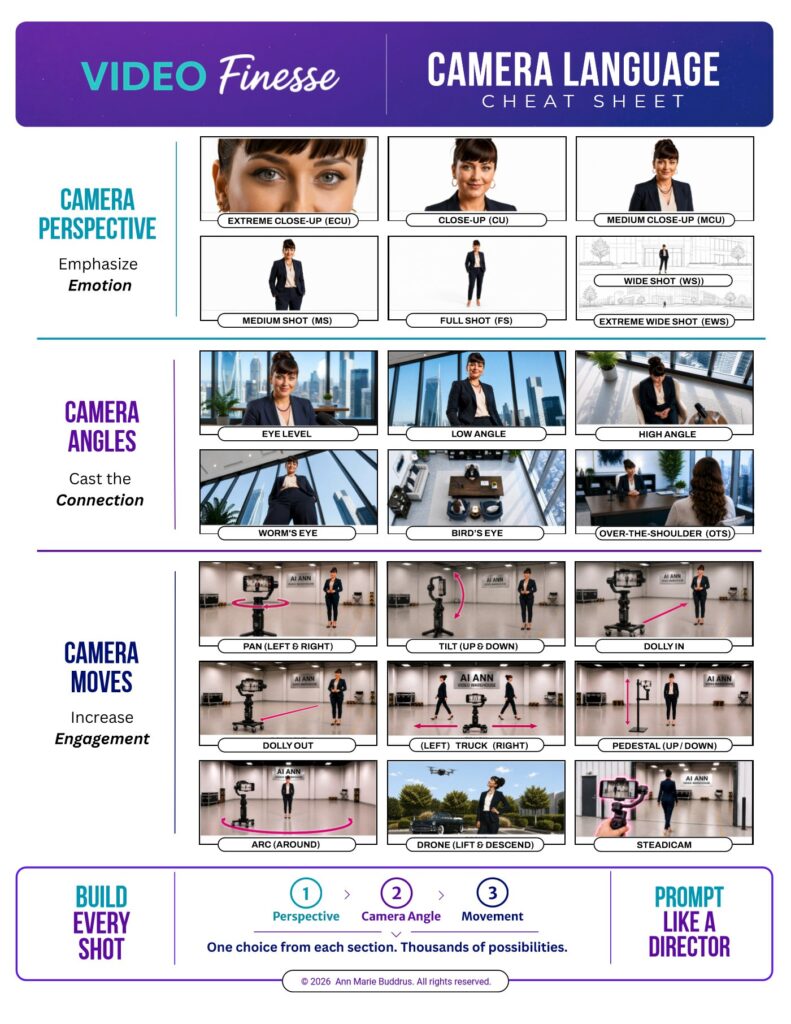
We start with CAMERA PERSPECTIVES, because one of the simplest ways to influence how an audience experiences a scene is to determine how close they are to the subject. Moving the camera closer or farther away doesn’t just change what we see. It changes how we feel about what we see.

Your audience is waiting. Give them something unforgettable.

One choice from each section. Thousands of possibilities.

Camera Perspectives Emphasize Emotion

ECU (Extreme Close-Up)
ECU (Extreme Close-Up) Focuses intensely on a single feature, often the eyes (or hands), filling the entire frame. Used for extreme dramatic emphasis.
CU (Close-Up)
CU (Close-Up) Frames the subject from the top of the shoulders to just above the head. Great for capturing emotion and facial expressions.
MCU (Medium Close-Up)
MCU (Medium Close-Up) Frames the subject from the chest up. A standard conversational shot that balances expression with a hint of the background.
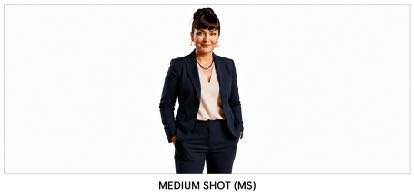
MS (Medium Shot)
MS (Medium Shot) Frames the subject from the waist up capturing both body language and immediate surroundings. The classic story telling pose.
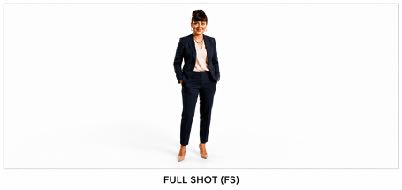
FS (Full Shot)
FS (Full Shot) Captures the subject's entire body from head to toe, showing them within the immediate environment.
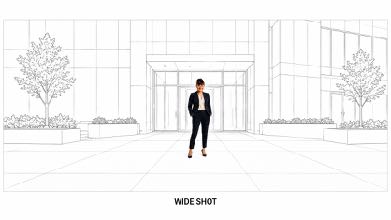
WS (Wide Shot)
WS (Wide Shot) The subject is visible but occupies a smaller portion of the frame, giving significant weight to the setting.
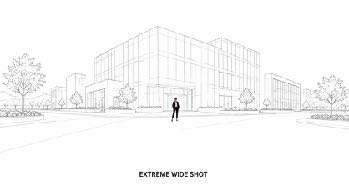
EWS (Extreme Wide Shot)
EWS (Extreme Wide Shot) The environment is the true subject. Characters are tiny or microscopic, heavily establishing scale and geography.

Once you’ve decided how to frame the shot, the next question is: where should we be looking from?

Think of the camera angle as another way to shape the emotional connection between your subject and your audience.

A small shift up, down, or to the side can make a character feel powerful, vulnerable, approachable, mysterious, or surprisingly intimate.

Camera Angles Cast The Connection

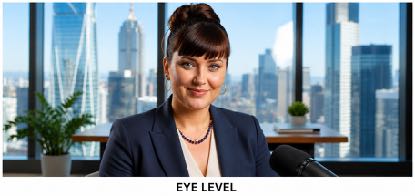
Eye-Level
Eye-Level The camera sits perfectly neutral at the subject's eye line. Creates a direct, grounded connection with the audience.
Low Angle
Low Angle The camera looks up at the subject. This adds dramatic weight, making the subject appear powerful, imposing, or heroic.
High Angle
High Angle The camera looks down on the subject. Useful for making them appear vulnerable, small, or overwhelmed.
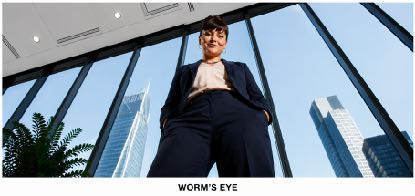
Worm's Eye
Worm's Eye An extreme low angle looking straight up from ground level. Used for surreal, stylized, or highly dramatic impressions.
Bird's Eye
Bird's Eye The camera looks directly down from a 90-degree angle. Creates a geometric, detached, or map-like layout of the scene.
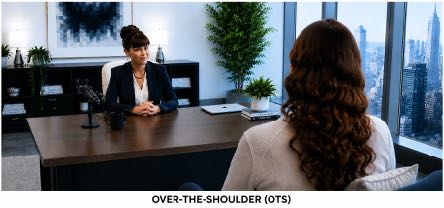
Over-the-Shoulder (OTS)
Over-the-Shoulder (OTS) Positioned behind one character's shoulder, framing the facing character. Essential for dialogue-heavy setups to show the relationship between subjects.

So far, we’ve used perspective and angle to portray what the audience sees and how they connect with the subject.

Now it’s time to put the camera into motion. Camera movement can reveal new information, follow action, build anticipation, or simply bring more energy to a scene. But movement also determines how the audience feels the story.

A camera that pushes in can pull us closer to a moment. A slow reveal can make us wait for it. A sweeping move can suddenly open up the world around the subject.

Even a subtle move can transform a static shot into an experience that pulls the audience along with the story.

So what does your story need the camera to do?

Camera Moves Increase Engagement

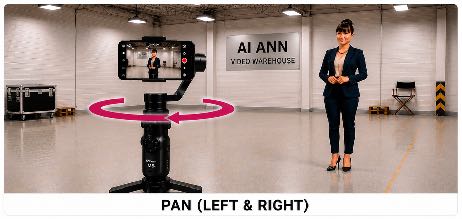
Pan (Left & Right)
Pan (Left & Right) The camera stays fixed on its axis but rotates horizontally from side to side. Used to scan an environment or follow panoramic movement.
Tilt (Up & Down)
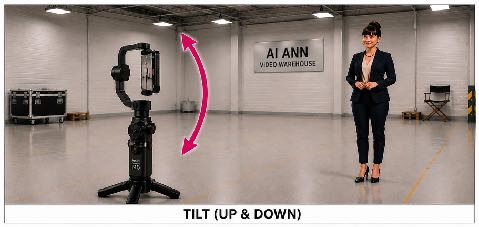
Tilt (Up & Down) The camera stays fixed on its axis but the lens tilts vertically up & down. Great for revealing environment scale or subject matter detail.
Dolly In
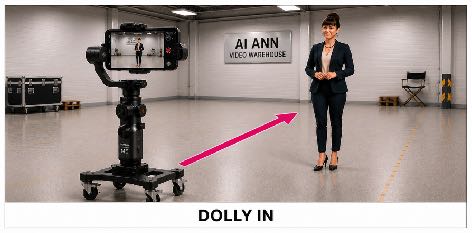
Dolly In The camera physically moves toward the subject. A dolly-in increases tension, focus, and emotional engagement.
Dolly Out
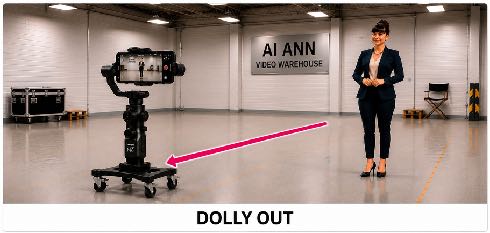
Dolly Out The camera physically moves away from the subject. A dolly-out releases tension or reveals the broader context.
Truck (Left & Right)
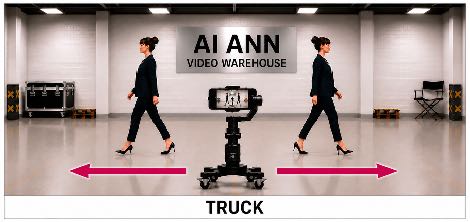
Truck (Left & Right) The camera physically travels laterally to the left or right, parallel to the action, usually fixed focus.
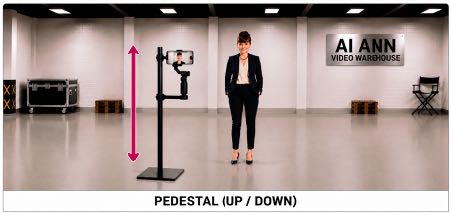
Pedestal Up/Down
Pedestal Up/Down The camera physically moves straight upward or downward without tilting, maintaining a parallel perspective to the subject.
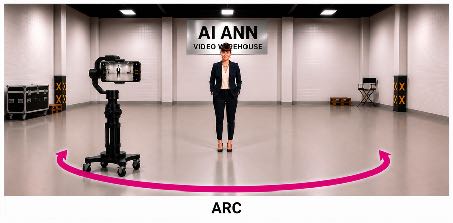
ARC (around)
ARC (around) The camera tracks around the subject in a circular or semi-circular motion, creating a dynamic rotating sense of space.
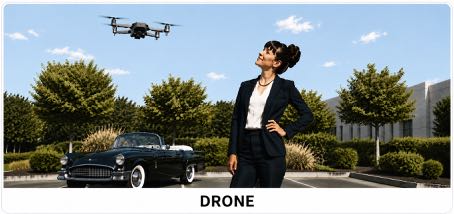
Drone Shot
Drone Shot A smooth sweeping vertical or diagonal movement that lifts the camera into the air, shifting from the subject at a close perspective to an epic high angle.
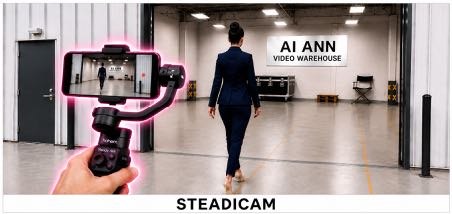
Steadicam
Steadicam Provides fluid, gliding movement while following subject action through a scene.

This concludes the Camera Language Primer. Here are some notes:

Most people approach AI video by asking:

“What prompt should I use?”

But the more powerful question is:

“What do I want the audience to experience?”

That shift changes everything. Once you know the emotion you want to create, you can make deliberate choices about the character, the story, the camera perspective, the angle, and the movement that will help create it.

Then the prompt stops being a collection of instructions and becomes something much more useful: a way to communicate your creative intent.

You’re no longer simply asking AI to generate a clip. You’re directing it to create an emotional experience for your viewers.

Characters connect. Stories persuade. Direction matters.

Next Steps?

By now you’ve seen that AI video isn’t just about engineering prompts.

It’s about creating something people remember. And memorable characters in humorous situations give you a powerful way to do that.

Some people want to master the tools themselves. Others want to be part of the creative process without having to master all the tools. The right approach depends on how hands-on you want to be.

Here are two sensible ways to continue your AI video journey.

Option 1

The Self-Guided Route

Want to make your own AI videos?

Good for you! If you enjoy experimenting, learning new tricks, and occasionally shouting “I made that!” at your screen, you’re in for an adventure.

What have you been itching to try? A character with a little attitude? Memorable character-driven ads? A funny series for your business? An abstract idea you’d love to bring to life? Something you haven’t quite figured out how to describe yet?

Tell me about it. I’d love to hear what you’re imagining and what you’ve tried so far. Once I know where you want to go, I can recommend people and places to help you get the creative wheels turning.

Tell Me What You Have In Mind
Option 2

Work One-to-One with Ann Marie

If you have ideas for your business videos but don’t have time to learn all the tools yourself, that’s where I can help.

We put you in the director’s chair while we find just the right stories and characters to bring your business to life.

To work with me you need:
1.) an established business identity
2.) a sense of humor

If you are new to AI Video, I recommend starting with a Character Sprint. Think of it as a creative test drive. A chance to work together on something real, explore the possibilities, and create your first memorable cast of characters.

Your hero character may be a stylized version of you… or a completely different persona who comes with a memorable twist. And if the chemistry is just right, that character could have more roles to play.

Want to see what happens next?

Check Out the Character Sprint